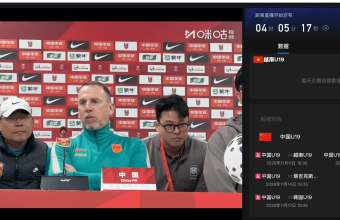
On November 17, 2026, the Chinese U19 Men's National Football Team will face the South Korean U19 Men's National Football Team in the Panda Cup. Overseas fans can find the live broadcast of the match through domestic sports broadcasting channels such as CCTV5+ and Migu. If you are abroad and encounter problems such as regional playback incompatibility or slow loading when accessing domestic platforms, you can try using...QuickFoxReturn to China Accelerator: Optimizes the network environment for connecting to domestic esports platforms.

1. When is the match between China U19 and South Korea U19? Where can I watch it live?
The 2026 CFA China Team Panda Cup Chengdu International Youth Football Tournament was held in Chengdu from November 11 to 17, with four teams participating: China U19, South Korea U19, Vietnam U19, and Tajikistan U19.
This match between China U19 and South Korea U19 is the highlight of the third round of the tournament.
Match Information:
- Match time: 19:35 on November 17, 2026 (Beijing time)
- Matchup: China U19 Men's National Football Team vs. South Korea U19 Men's National Football Team
- Match Venue: Chengdu Shuangliu Sports Center Stadium
- Competition Type: 2026 Panda Cup Round 3
- Viewing channels: CCTV5+, Migu and other domestic sports live streaming platforms
In the first two rounds, the Chinese U19 men's football team defeated Vietnam U19 3-1 and then drew 1-1 with Tajikistan U19, advancing to the final round with a record of one win and one draw. South Korea U19 also achieved one win and one draw, and their direct confrontation will influence the final rankings of this year's Panda Cup.
For fans in Australia, the UK, Japan, the US, Singapore, and other places, in addition to focusing on the game itself, they also need to confirm in advance whether domestic live streaming platforms can broadcast the game normally in their local areas.
2. Why might the live broadcast of the China U19 vs. South Korea U19 match be unavailable for overseas viewers?
When accessing domestic sports platforms from overseas, sometimes you can enter the homepage and view event information normally, but you encounter problems when clicking on live streams.
There are mainly the following situations:
1. There are regional differences in the broadcast of the event.
Live sports broadcasts often involve different regions having different broadcasting licenses. Some platforms determine viewable content based on the user's current network location, which may result in messages such as "Playback is not currently supported in your region."
2. Unstable cross-border network connectivity
Domestic video platforms primarily serve domestic users with their live streaming services. When accessing from overseas, the long cross-border network links and network congestion can lead to slow loading, frequent buffering, or decreased video quality.
3. Platform accounts and playback conditions differ.
Even if you can open the live stream page normally, some event content may still require you to log in to your account, activate related privileges, or use a specific client. A normal network connection does not mean that all live stream content can be watched directly.
Therefore, when watching the live broadcast of the China U19 vs. South Korea U19 match overseas, it is necessary to find the correct broadcast channel and also check the network connection and the platform's playback requirements.

III. How can QuickFox improve the viewing experience for overseas viewers watching the China U19 vs. South Korea U19 live stream?
In response to network issues encountered when accessing domestic sports live streaming platforms from overseas, QuickFox offers a dedicated network acceleration service for overseas users returning to China.
QuickFox optimizes the connection between overseas devices and domestic platforms by using domestic network lines, making it suitable for domestic video and audio, sports live streaming, and other network service scenarios.
1. Optimize the network path connecting overseas platforms to domestic live streaming platforms.
If you experience unstable cross-border connections when using CCTV5+, CCTV Video, or Migu platforms overseas, you can first open QuickFox and then re-enter the live event page.
QuickFox automatically matches the network route back to China, eliminating the need for users to manually select nodes and reducing complex network setup steps.
For users who previously experienced frequent buffering due to poor cross-border network connectivity, network path optimization may provide a more stable loading experience. However, the actual effect still depends on local network quality, platform services, and event playback permissions.
2. You can also try watching live streams in the free video/audio mode.
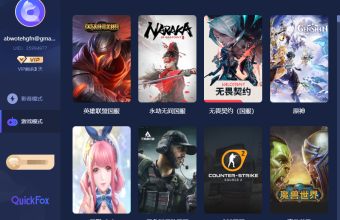
QuickFox's "Return to China" video mode is free to use. In addition to watching domestic videos and listening to music, it can also be used to access live content from supported domestic platforms.
If you only watch Chinese U19 matches occasionally, you can try the free video mode first to check the playback status of the live streaming platform.
For users who frequently watch long-running sports events and have higher requirements for real-time playback stability, QuickFox also offers a dedicated live streaming mode optimized for live streaming scenarios.
What needs to be distinguished is:
- Return to China video mode: Free users can use it, or try watching live streams on domestic platforms.
- Dedicated live streaming mode: Optimization for live streaming scenarios such as sports events and esports requires VIP privileges.
The features of regular VIP and premium VIP are not exactly the same; please refer to the benefits published in the QuickFox client for details.
3. Reduce network interference during long periods of watching sports.
A football match typically lasts 90 minutes, including halftime and stoppage time. Compared to short videos, live broadcasts of matches require a more consistent internet connection.
If you experience frequent buffering issues while watching the China U19 vs. South Korea U19 match, you can improve your viewing experience by considering the following:
- Use a stable Wi-Fi or mobile network to avoid frequently switching connection methods.
- Test the broadcast in advance to avoid problems being identified close to kickoff.
- Close unnecessary large file transfers and background programs that consume bandwidth.
- Adjust the live stream quality as needed based on real-time network conditions.
QuickFox is primarily used to improve network connectivity when returning to China. With a stable local network environment, it is more conducive to continuously watching live broadcasts of domestic sports events.
Watching domestic sports events live from overseas: Common problems and improvement methods
| Viewing Scene | Problems that may be encountered when the network is not optimized | Improvements you can try after using QuickFox |
|---|---|---|
| Open domestic live streaming platforms | Slow page loading | Optimize network paths for accessing domestic services |
| Enter the live broadcast room | Continuous buffering, screen unable to load | Improve some cross-border connectivity issues |
| Watching the game for a long time | Playback interruption, image quality fluctuation | Reduce connection interference with a stable network |
| Regional playback prompts appear | Some content cannot be viewed. | You can try adjusting your network environment, but you still need to comply with the platform's playback rules. |
It should be noted that QuickFox cannot replace event authorization, platform membership or account verification, nor can it guarantee the same viewing experience across all regions and devices.

IV. Three steps to watch the live broadcast of China U19 using QuickFox overseas
If you plan to watch this Panda Cup match from overseas using a domestic platform, you can refer to the following steps.
Step 1: Install QuickFox and log in to your account
passQuickFox official websiteGet the client for your device.
QuickFox supports devices such as iOS, Android, Windows, and Mac, and users can choose the appropriate version based on their viewing method.
After installation, log in to your account and enter the main interface.
Step 2: Select the appropriate mode and connect.
If you mainly watch domestic video platforms, you can first choose the free domestic video mode.
After clicking the connection button, wait for QuickFox to automatically match the route back to China.
If you have already activated VIP, you can also switch to the dedicated live streaming mode as needed.
There's no need to manually select a specific region node; once the connection is successful, you can access the domestic live streaming platform.
Step 3: Open the event live streaming platform
Keep your QuickFox connected, open the corresponding client such as Migu or CCTV Video, and search for "China U19", "Korea U19" or "Panda Cup" to find the live broadcast entrance for the day's matches.
If you have previously opened the live stream page, it is recommended to completely exit the client and then re-enter. For the web version, you can refresh the page.
If you are still unable to play the game, you should continue to check whether the platform provides viewing services for the current region, as well as the conditions such as account, membership, and content authorization.

V. Frequently Asked Questions about Watching the China U19 vs. South Korea U19 Match Live Stream Overseas
1. What time does the China U19 vs. South Korea U19 match start?
The match is scheduled for 19:35 Beijing time on November 17, 2026, at the Chengdu Shuangliu Sports Center Stadium. Overseas viewers need to convert the viewing time according to their local time zone.
2. Can overseas viewers watch the live broadcast of China U19 through Migu?
You can first search for the corresponding live stream entry on the Migu platform, but whether you can actually play it depends on the service and viewing permissions provided by the platform in your location. If you encounter cross-border network connection problems, you can try using QuickFox to improve your network environment.
3. Is it necessary to pay to watch the Panda Cup live stream on QuickFox?
QuickFox's free "Return to China" video mode allows you to try watching live streams on domestic platforms. The dedicated live stream acceleration mode requires a VIP membership. Whether the event platform itself charges fees depends on its official website.
4. Why can't I play videos even after starting QuickFox?
We recommend checking if QuickFox is connected successfully. Completely close and reopen the live streaming platform, and ensure your network is stable. If you still cannot watch, check the platform's regional authorization, account, and membership requirements. Some playback issues are beyond the scope of network acceleration solutions.
5. After the match, will we still be able to watch the replay of the China U19 vs. South Korea U19 game?
After the match, you can check with Migu, CCTV Sports, or the official channels of the Chinese national football team to see if they have released match highlights, videos, or recaps. Specific replay content and availability are subject to the platform's actual arrangements.
VI. Summary: Overseas viewers should prepare in advance for watching the live broadcast of the China U19 vs. South Korea U19 match.
The 2026 Panda Cup match between China U19 and South Korea U19 will kick off at 19:35 on November 17th. For overseas fans, confirming the match broadcast information on domestic platforms such as CCTV5+ and Migu in advance, and testing the live stream playback, can reduce the hassle of searching for viewing options at the last minute.
If you encounter problems such as slow loading or unstable cross-border connections when using domestic live streaming platforms, you can try QuickFox Back-to-China Accelerator and choose the appropriate mode to optimize your network environment.
Whether in the UK, Australia, Japan, or other overseas regions, it is recommended to check your network, account, and platform viewing permissions in advance and make preparations before the match.
Note: The event information in this article is compiled based on publicly available information released before the event. Broadcast arrangements, viewing rights, and actual playback quality are subject to the latest information released by the event organizers and relevant platforms.