 ×
Friends who like to play Plants vs. Zombies: Garden Warfare must know about this Chinese version of Plants vs. Zombies: Garden Warfare. Friends overseas want to play Plants vs. Zombies: Garden Warfare. Although there is an international version of Plants vs. Zombies: Garden Warfare, Chinese student gamers abroad are still used to playing the national version of Plants vs. Zombies: Garden Warfare. Not only because Chinese language, there are also good friends who teamed up with Plants vs. Zombies: Garden Warfare in the Chinese server area. When you are overseas and playing the Chinese version of the game Plants vs. Zombies: Garden Warfare, the lag is high and the connection often drops? Use the QuickFox accelerator to accelerate the Chinese version of Plants vs. Zombies: Garden Warfare with one click. It is extremely fast and stable with no packet loss. It perfectly supports accelerated multi-platform use on Windows, iOS, and Android, and solves the problem when you play the domestic game Plants vs. Zombies: Garden Warfare abroad. Issues such as network region restrictions, delays, lags, and disconnections were encountered.
New users enter redemption code Get a free 12-hour membership

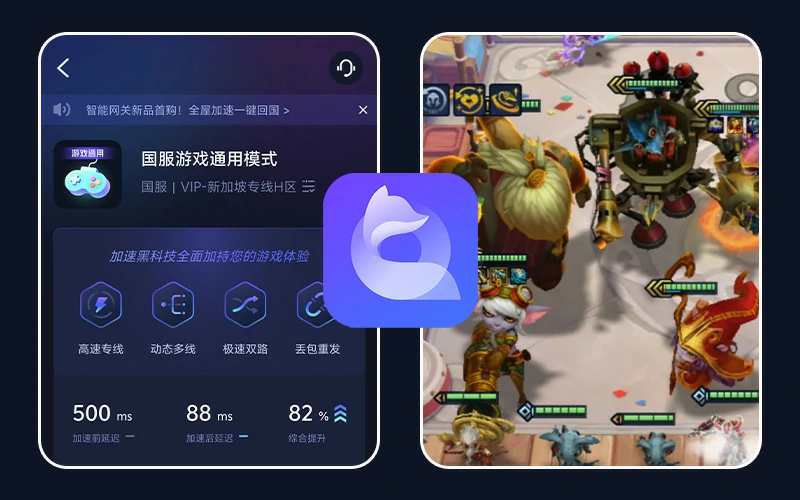
Overseas Chinese and international students who encounter high latency and disconnection issues when playing Chinese servers for games can use QuickFox, a game accelerator, to connect directly to the Chinese server with one click for a smoother gaming experience.
Why is there high lag when playing Plants vs. Zombies: Garden Warfare overseas?
The reason why Plants vs. Zombies: Garden Warfare is very lag when playing abroad is mainly because the game server is in China. Mainland players will have relatively low latency when playing the game. However, even if you use high-speed Wifi to play the game overseas, the latency will be relatively high and the connection will be unstable. The screen may freeze or even drift. Regarding the knowledge about game network delay, generally speaking, the optimal state for playing games is within 10ms. Games can be played smoothly within 150ms, which basically does not affect the experience. More than 250ms is completely stuck for a competitive game like Plants vs. Zombies: Garden Warfare, and it may become impossible to control. The solution to speeding up Plants vs. Zombies: Garden Warfare when playing overseas is, of course, how to speed up Plants vs. Zombies: Garden Warfare. The best solution is to use a network accelerator. Directly connect to domestic server nodes through virtual channels, eliminating many intermediate links in network transmission, which can effectively reduce delays and improve gaming experience. Of course, your own network must be stable and fast enough to achieve the best results.
For foreign players, the Chinese version of Plants vs. Zombies: Garden Warfare has high latency. Generally, overseas players cannot support domestic game play because the server distance is too far and the network cannot reach the game server immediately, which leads to serious latency issues. At this time, network optimization can only be carried out through some external products. QuickFox accelerator can effectively reduce delays, not only allow smoother play, but also provide various restriction lifting functions.
Almost completely covering nearly 1000+ online festivals in all Chinese countries around the world, professional national server game lines, whether in Europe, the United States, Japan, South Korea, Thailand, Italy, Spain, Myanmar, Singapore, Malaysia, or in Hong Kong, Macau, Taiwan region, there is always a Chinese VPN acceleration node that best matches you.
Support overseas players to play all the games in mainland China, including the popular online games Glory of Kings, Peace Elite, Yuanshen, LOL, Knives Out, Ark of Tomorrow, Onmyoji, World of Warcraft, Fantasy Westward Journey, Cross Fire, Jianwang 3, and Hearthstone , Legend of Blood, Journey to the West, World of Tanks, Overwatch, One Punch Man, QQ Speed, Honkai 3rd, PlayerUnknown's Battlegrounds, Tianlong Babu, Moyu, Nishuihan, Xunxian, etc. All Chinese online games and mainland mobile games, etc.
Support laptop, desktop and other PC users to play Chinese computer online games overseas, support Huawei, Xiaomi, VIVO, OPPO, Meizu and other Android mobile users to play Android system Chinese handheld games abroad, and support iPhone (Apple) mobile users to accelerate IiOS system mobile games on mainland servers overseas.
QuickFox free online game acceleration service for overseas players, the line to the world, covering all countries around the world, using self-developed unique anti-latency acceleration technology, so that the network environment and speed to the best, can effectively reduce the delay, lag, dropped lines, slow loading, ping value high problems, professional national game gas pedal, free acceleration of China's massive game.
No need to manually select nodes; even first-time users of QuickFox can start accelerating within minutes.
Download QuickFox for freeNew users enter redemption code Get a free 12-hour membership
Clients are available for Windows, Mac, iOS, and Android; simply download the one for your device.
Register with your mobile phone number or email address, enter the redemption code QF51 in the App, and receive a free 12-hour membership.
Search for "the game you want to play", click to accelerate, open the game, and keep QuickFox running in the background.
New users enter redemption code Get a free 12-hour membership

What should Chinese students and Chinese students abroad do when playing the Chinese version of Plants vs. Zombies: Garden Warfare and experiencing severe network lag and lag? The best solution to speed up Plants vs. Zombies: Garden Warfare is to use a network accelerator. Directly connect to domestic server nodes through virtual channels, eliminating many intermediate links in network transmission, which can effectively reduce delays and improve gaming experience. Of course, your own network must be stable and fast enough to achieve the best results. QuickFox accelerates the Chinese version of Plants vs. Zombies: Garden Warfare with one click.

The game "Plants vs. Zombies: Garden Warfare" is very popular at home and abroad. Many Chinese and international students still like to play Plants vs. Zombies: Garden Warfare with their domestic classmates and friends when they go overseas, such as the United States, Canada, and Malaysia. However, when playing domestic Plants vs. Zombies: Garden Warfare overseas, because it is far from domestic game servers, there will be high delays, lags, etc. Many people are asking what accelerator to use when playing Plants vs. Zombies: Garden Warfare abroad. The main way to solve the lag in Plants vs. Zombies: Garden Warfare is to use an overseas accelerator to reduce network latency.
Popular Chinese mobile and PC games can be accelerated. Click on the game to view the corresponding overseas acceleration tutorial.
 King's GloryOverseas Acceleration ›
 Peace EliteOverseas Acceleration ›
 Hero LeagueOverseas Acceleration ›
 Original GodOverseas Acceleration ›
 Eternal calamityOverseas Acceleration ›
 Battle of the Golden Shovel and ShovelOverseas Acceleration ›
 Dark Zone BreakoutOverseas Acceleration ›
 Egg Waffle PartyOverseas Acceleration ›
 Tomorrow's ArkOverseas Acceleration ›
 Fifth PersonalityOverseas Acceleration ›
 World of WarcraftOverseas Acceleration ›
 Sword Art Online 3Overseas Acceleration ›
 Reverse Water ColdOverseas Acceleration ›
 CrossfireOverseas Acceleration ›
 Light encounterOverseas Acceleration ›
 Dungeons & DragonsOverseas Acceleration ›
Swipe left and right to view all 16 models ›
Couldn't find the game you play?Download the QuickFox App, search for the game name in Game Mode to speed up the process.
Version updates, event benefits, and speed-up tutorials will be continuously updated.


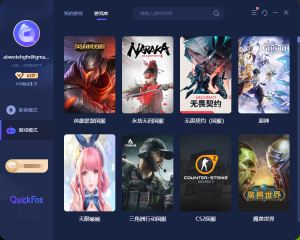
It works on Windows, Mac, iOS, and Android. Playing on the Chinese server from overseas offers lower latency and a more stable gaming experience.
New users enter redemption code
Get 12-Hour Free Membership