 ×
×
Friends who like to play Quake must be familiar with the national version of the Quake game "Quake". Friends overseas want to play the national version of the Quake game, but they find problems such as being unable to log in. , although there is an international version of Quake, overseas Chinese student gamers may habitually play the national version of Quake, not only because of the Chinese language, but also because of the Chinese language, and also because some of their good friends who teamed up with Quake are all in the national version. district. When you are overseas and playing the Chinese mainland game Quake, the lag is high and you often get disconnected? Use the QuickFox accelerator to accelerate the Quake domestic game in one click. It is extremely fast and stable without packet loss. It perfectly supports the acceleration of Windows, iOS, and Android multi-platforms, and solves the network region restrictions that you encounter when playing the domestic game Quake abroad. , problems such as delayed lag and disconnection.
New users enter redemption code Get a free 12-hour membership

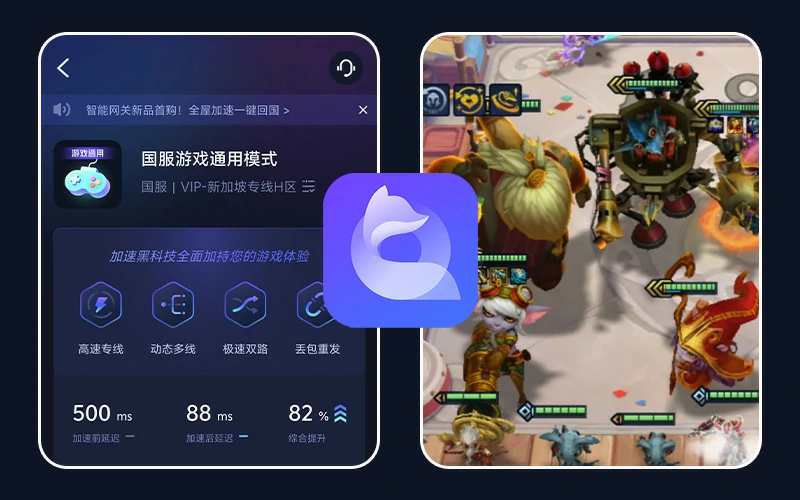
海外华人、留学生玩《雷神之锤》遇到延迟高、掉线问题,使用 QuickFox 回国加速器一键直连国服,游戏体验更流畅。
Why is there high latency when playing Quake overseas?
The main reason why Quake is laggy when playing abroad is because its game server is in China, and the delay for mainland players will be relatively low. However, even if you use high-speed Wifi when playing games overseas, the delay will be relatively high, the connection will be unstable, and the picture may be laggy. Stuttering or even drifting. Regarding the knowledge about game network delay, generally speaking, the optimal state for playing games is within 10ms. Games can be played smoothly within 150ms, which basically does not affect the experience. More than 250ms is completely stuck for a competitive game like Quake, and it may become impossible to control. The solution to accelerating Quake overseas is to use a network accelerator. Of course, the best solution to speed up Quake is to use a network accelerator. . Directly connect to domestic server nodes through virtual channels, eliminating many intermediate links in network transmission, which can effectively reduce delays and improve gaming experience. Of course, your own network must be stable and fast enough to achieve the best results.
Foreign players playing the national server Quake have high latency. Generally speaking, overseas players cannot support domestic game play because the server is too far away and the network cannot reach the game server immediately, which leads to serious latency issues. At this time, network optimization can only be carried out through some external products. The QuickFox accelerator can effectively reduce delays, not only allow smoother play, but also provide various restriction lifting functions.
Almost completely covering nearly 1000+ online festivals in all Chinese countries around the world, professional national server game lines, whether in Europe, the United States, Japan, South Korea, Thailand, Italy, Spain, Myanmar, Singapore, Malaysia, or in Hong Kong, Macau, Taiwan region, there is always a Chinese VPN acceleration node that best matches you.
Support overseas players to play all the games in mainland China, including the popular online games Glory of Kings, Peace Elite, Yuanshen, LOL, Knives Out, Ark of Tomorrow, Onmyoji, World of Warcraft, Fantasy Westward Journey, Cross Fire, Jianwang 3, and Hearthstone , Legend of Blood, Journey to the West, World of Tanks, Overwatch, One Punch Man, QQ Speed, Honkai 3rd, PlayerUnknown's Battlegrounds, Tianlong Babu, Moyu, Nishuihan, Xunxian, etc. All Chinese online games and mainland mobile games, etc.
Support laptop, desktop and other PC users to play Chinese computer online games overseas, support Huawei, Xiaomi, VIVO, OPPO, Meizu and other Android mobile users to play Android system Chinese handheld games abroad, and support iPhone (Apple) mobile users to accelerate IiOS system mobile games on mainland servers overseas.
QuickFox free online game acceleration service for overseas players, the line to the world, covering all countries around the world, using self-developed unique anti-latency acceleration technology, so that the network environment and speed to the best, can effectively reduce the delay, lag, dropped lines, slow loading, ping value high problems, professional national game gas pedal, free acceleration of China's massive game.
No need to manually select nodes; even first-time users of QuickFox can start accelerating within minutes.
QuickFox 一键加速雷神之锤New users enter redemption code Get a free 12-hour membership
Clients are available for Windows, Mac, iOS, and Android; simply download the one for your device.
Register with your mobile phone number or email address, enter the redemption code QF51 in the App, and receive a free 12-hour membership.
搜索“雷神之锤”,点击加速后打开游戏,保持 QuickFox 在后台运行。
New users enter redemption code Get a free 12-hour membership

What should international students and Chinese people abroad do if they encounter serious network delays and lags while playing the Quake Chinese server? The best solution to speed up Quake is to use a network accelerator. Directly connect to domestic server nodes through virtual channels, eliminating many intermediate links in network transmission, which can effectively reduce delays and improve gaming experience. Of course, your own network must be stable and fast enough to achieve the best results. QuickFox accelerates the Quake Chinese server game with one click.

The game "Quake" is very popular at home and abroad. Many Chinese and international students still like to play Quake with their domestic classmates and friends when they go overseas, such as the United States, Canada, and Malaysia. However, when playing domestic Quake overseas, there will be high delays, lags, etc. due to the distance from domestic game servers. Many people are asking what accelerator should be used to play Quake abroad. The main way to solve the lag and delay in Quake is to use a Quake overseas accelerator to reduce network latency.
Popular Chinese mobile and PC games can be accelerated. Click on the game to view the corresponding overseas acceleration tutorial.
 King's GloryOverseas Acceleration ›
 Peace EliteOverseas Acceleration ›
 Hero LeagueOverseas Acceleration ›
 Original GodOverseas Acceleration ›
 Eternal calamityOverseas Acceleration ›
 Battle of the Golden Shovel and ShovelOverseas Acceleration ›
 Dark Zone BreakoutOverseas Acceleration ›
 Egg Waffle PartyOverseas Acceleration ›
 Tomorrow's ArkOverseas Acceleration ›
 Fifth PersonalityOverseas Acceleration ›
 World of WarcraftOverseas Acceleration ›
 Sword Art Online 3Overseas Acceleration ›
 Reverse Water ColdOverseas Acceleration ›
 CrossfireOverseas Acceleration ›
 Light encounterOverseas Acceleration ›
 Dungeons & DragonsOverseas Acceleration ›
Swipe left and right to view all 16 models ›
Couldn't find the game you play?Download the QuickFox App, search for the game name in Game Mode to speed up the process.
Version updates, event benefits, and speed-up tutorials will be continuously updated.



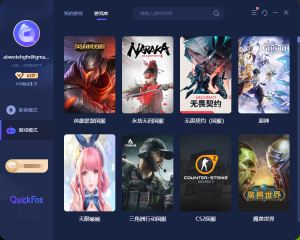
It works on Windows, Mac, iOS, and Android. Playing on the Chinese server from overseas offers lower latency and a more stable gaming experience.
New users enter redemption code
Get 12-Hour Free Membership