I finally got the new version update and excitedly opened Starry Sky.railwayNational Server,resultRoleStanding still and waiting a second or two for the animation to play when you press a skill button, with the latency in the upper right corner soaring to 300ms—it feels like you're eagerly anticipating opening a package, only to find it's still floating in the Pacific Ocean.

Running around the open world is even more frustrating. On the streets of Pinocchio, your character stutters like they're sleepwalking, NPC dialogues take forever to load, and switching scenes just makes you want to quit. The high-difficulty simulated universe mode is even more absurd; you press the cheat codes, but your character just won't move, and by the time your network catches up, you've already been defeated by monsters. The lag issues in Star Trek Online overseas aren't due to poor reflexes; it's the network that's holding you back.
To put it bluntly, the Chinese server is located in China, while you're overseas. Data packets have to travel halfway around the world and back. Physical distance combined with peak-hour congestion on international lines makes a latency of 200ms or more perfectly normal. Even if your home internet speed is fast, it won't help; bandwidth determines download speed, not the few hundred milliseconds of response time between pressing a skill and your character moving.
How to solve this? QuickFox one-click acceleration to return to the Chinese server.
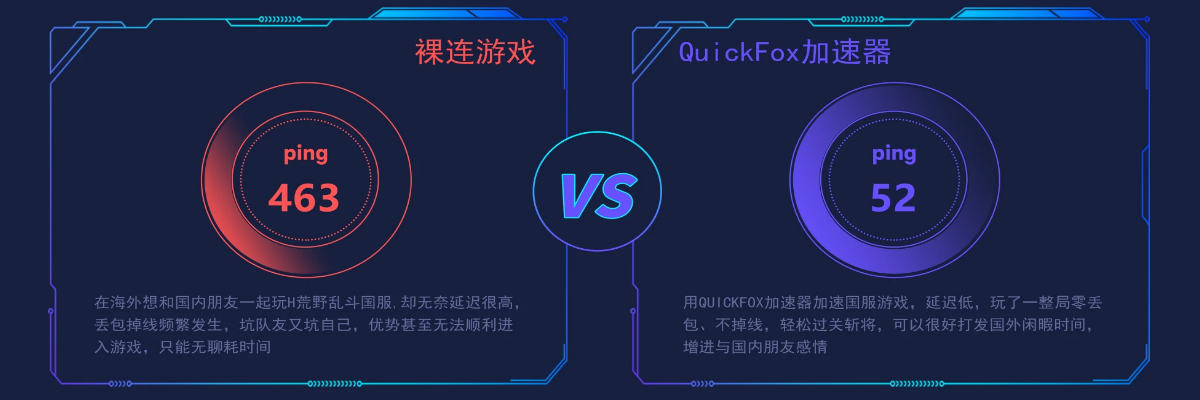
Instead of sighing at loading screens every day, why not just use a domestic accelerator? QuickFox has optimized its lines specifically for high latency issues when playing games overseas, helping you bypass congested public networks and connect directly to domestic servers via dedicated lines. In actual tests, it can reduce the latency of Star Railway from 200ms+ to 60-110ms, so you no longer have to watch slideshows while playing dungeons.
It's very easy to use—download QuickFox, select "Honkai Impact: Star Railway" for one-click acceleration, and then open the game after a successful connection. Remember...Turn on the accelerator before starting the game.Otherwise, switching networks midway can easily cause disconnections. It supports multiple devices including computers and mobile phones, allowing one account to be online on up to three devices simultaneously. You can even browse Bilibili guides on your phone while playing Star Train.
Lag when playing Star Railways (Chinese server) from overseas isn't your fault; it's the distance and network connection that's causing the problem. Instead of sighing in frustration every time there's lag, try QuickFox Star Railways (Chinese server) accelerator. New users get a free trial. Try it out and see how much your latency drops. Once you experience it, you won't want to play without one anymore!